Prescription workflows
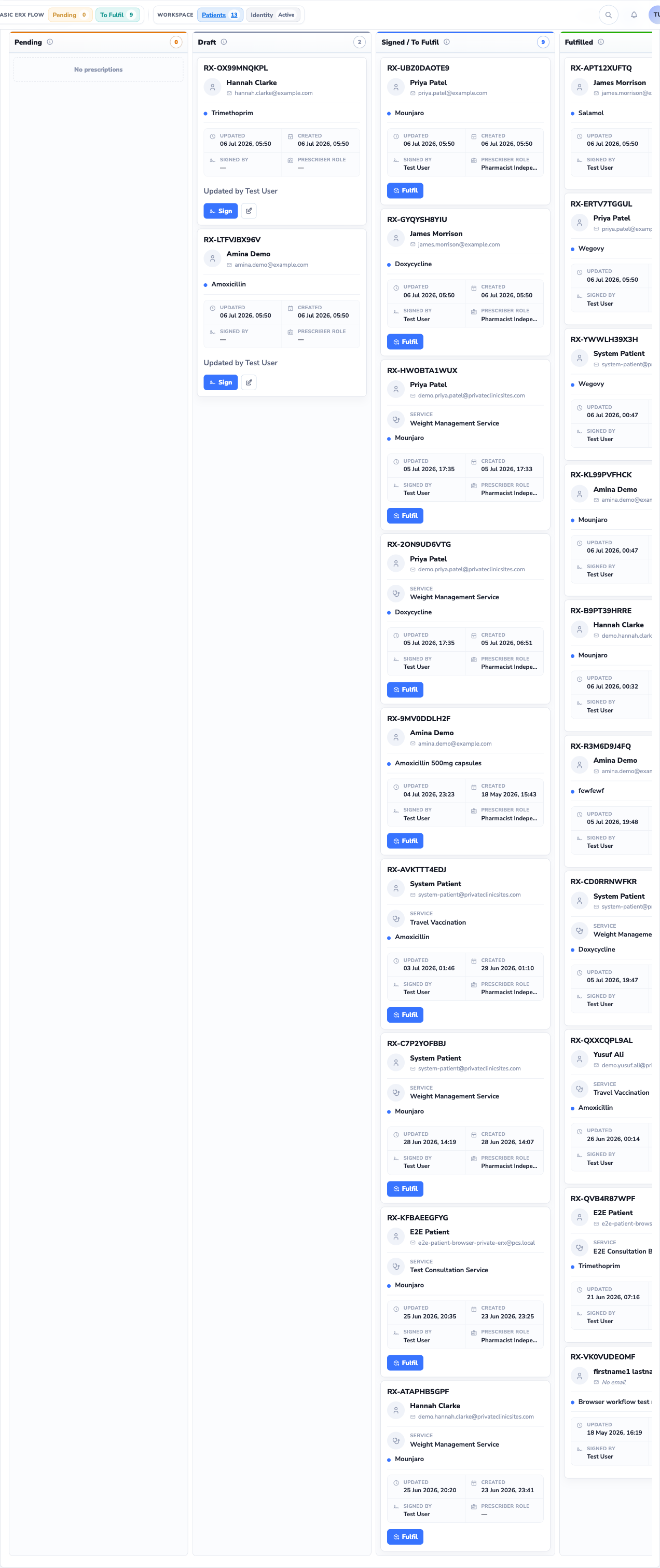
Customisable kanban flows from draft to fulfilment. Sign digitally, track status, and send to pharmacy or back to PCS Clinic.
Private eRx gives clinicians a secure workspace to create, sign, and track electronic prescriptions — with PCS Hub medicine library sync, PCS Clinic handoff, and role-based team workflows built in.
UK-hosted · Advanced electronic signatures · Dispensing tokens
Private clinicians still juggle handwritten pads, scanned PDFs, and disconnected pharmacy emails. Each handoff adds delay, risk, and admin — with little visibility once a prescription leaves the room.
Private eRx replaces that patchwork with a single prescribing workspace: structured medicines, digital signatures, status tracking, and secure fulfilment — all connected to PCS Hub and PCS Clinic when your practice needs it.
Everything clinicians need to move from paper to compliant electronic prescriptions — connected to the wider PCS platform.
Customisable kanban flows from draft to fulfilment. Sign digitally, track status, and send to pharmacy or back to PCS Clinic.
Sync and import from the shared PCS medicine catalogue. Bulk import, reset defaults, and keep your clinic formulary current.
Receive consultations from PCS Clinic and return signed prescriptions seamlessly — with evidence and audit trail preserved.
Invite staff, assign custom roles, and control who can prescribe, sign, fulfil, or manage clinic settings.
Move prescriptions through custom workflow columns — draft, awaiting signature, ready to send, and fulfilled. Each card shows patient, medicine, and status so nothing slips through between consult and pharmacy.
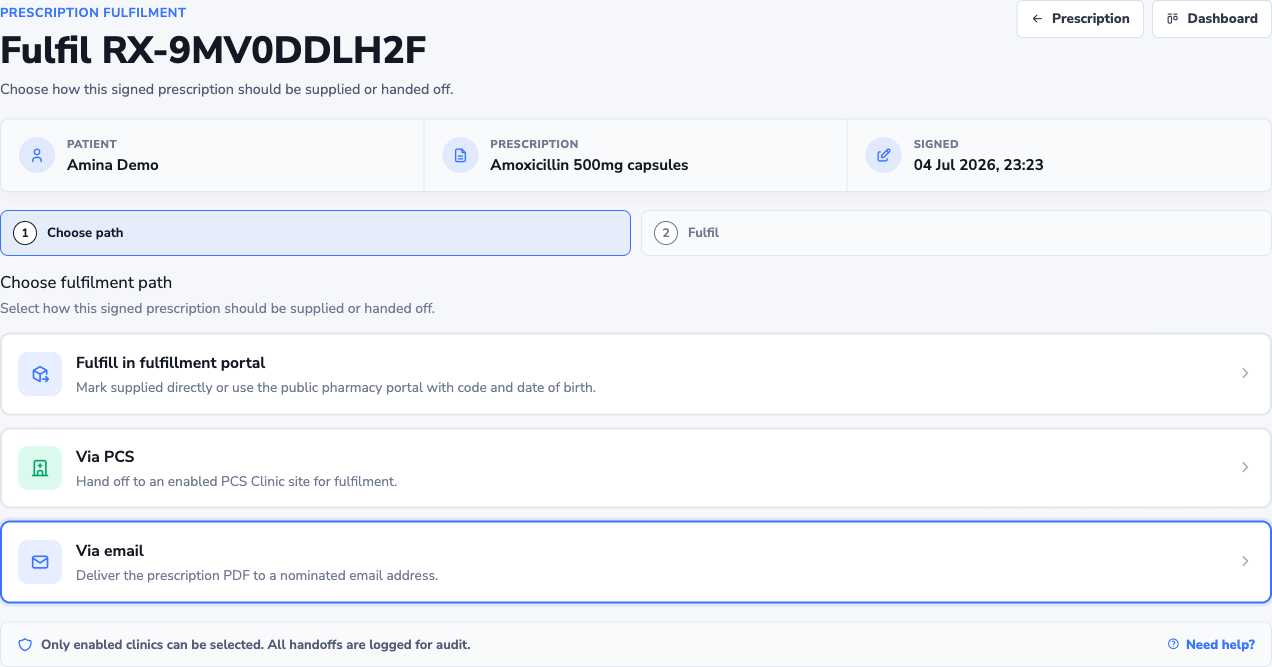
Send prescriptions by email with a protected fulfilment link, or return them to PCS Clinic for integrated dispensing. Pharmacies retrieve scripts with a token — reducing exposure of patient data in inboxes.
Designed for every role in the private prescribing chain — from the consulting room to the pharmacy counter.
GPs, specialists, and nurse prescribers running private clinics who need a dedicated e-prescribing workspace with digital signatures and patient records.
Community and specialist pharmacies fulfilling private electronic prescriptions through secure token-based retrieval — no account required for lookup.
Practice managers and clinic owners on PCS Clinic who want prescribing integrated with bookings, consultations, and team permissions.
Private eRx sits at the prescribing layer — fed by PCS Hub data and PCS Clinic consultations, with fulfilment back to pharmacy or clinic.
Central medicine library and platform configuration. Clinics import formulary items and stay aligned with shared catalogue updates.
Patient bookings, consultations, and clinic operations. When a consult needs a script, hand off to Private eRx with context intact.
Prescribe, sign, and track electronic private prescriptions. Return fulfilled scripts to Clinic or send securely to pharmacy.
A clear path for clinicians joining the platform and issuing their first electronic prescription.
Complete onboarding with identity verification. We review your submission before activating your prescribing workspace.
Create patient records, import from the PCS Hub library, and configure your clinic's prescription workflows.
Issue signed e-prescriptions, send to pharmacy by email, or hand back to PCS Clinic for integrated fulfilment.
Security and traceability are not add-ons — they are woven through every prescription action.
Workflows designed around private UK prescribing practice — structured medicines, prescriber verification, and clinic-scoped patient data.
Prescriptions are signed digitally before release. Signature events are recorded with timestamp and prescriber identity.
Draft, edit, sign, send, and fulfilment actions are logged so clinics can demonstrate what happened and when.
Fulfilment tokens limit who can view a script. Pharmacies access only what they need to dispense — not a permanent open file.
Early feedback from private practice teams using electronic prescribing workflows.
“Having consultations from PCS Clinic land ready to prescribe cut our admin time significantly. We are not re-entering patient details or hunting for paper pads.”
“The prescription board gives the whole team visibility. We know what is waiting for signature and what has gone to pharmacy without chasing emails.”
“Token-based pharmacy fulfilment is exactly what we needed — patients get their medicines faster and we have a clear record of when scripts were retrieved.”
Common questions from clinicians and clinic teams considering Private eRx.
Licensed prescribers and clinic owners completing identity verification. We review registrations before activating prescribing access to ensure each workspace is appropriately authorised.
No. Private eRx works as a standalone prescribing workspace. If you also use PCS Clinic, consultations can hand off to Private eRx and signed scripts can return to the clinic record automatically.
You can email a fulfilment link to the patient's chosen pharmacy. The pharmacy uses the secure token lookup page to retrieve script details — no Private eRx account required on their side.
Yes. Invite team members and assign custom roles controlling who can draft, sign, fulfil, or manage clinic settings. Permissions are enforced throughout the prescribing workflow.
Private eRx is UK-hosted. Patient records, prescription history, and audit logs remain within your clinic workspace with role-based access controls.
Register your interest to begin onboarding. After verification review, your prescribing workspace is activated and you can import medicines from PCS Hub and start issuing electronic prescriptions.
Private eRx is available to verified prescribers and clinic teams within the PCS ecosystem. Register to begin onboarding — our team reviews each application before activation.
Join clinicians using Private eRx within the PCS ecosystem — secure, auditable, and designed for private practice workflows.